FLY GEAR SWAP / GETTING STARTED
Calibrate your RadioMaster gimbals
Pocket and other EdgeTX radios • Monochrome + color • Updated 22 October 2026
Keep the aircraft flight battery disconnected. Calibration runs on the radio only.
Calibrate your RadioMaster gimbals
Pocket first / Monochrome + color EdgeTX / Beginner walkthrough
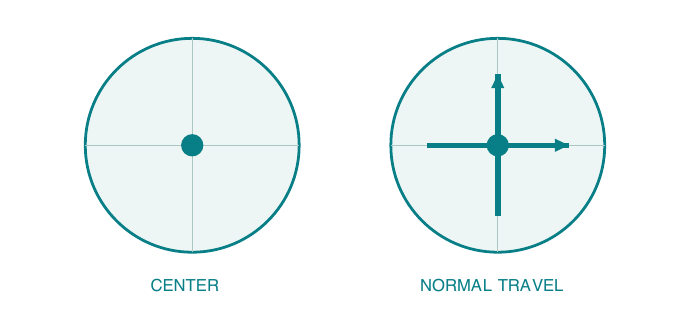
Teach the radio where the center and normal travel limits of its sticks are. This is software calibration in EdgeTX, the radio operating system. ExpressLRS (ELRS) carries the radio link to the aircraft; it does not run this calibration.
Aircraft OFF, flight battery disconnected. Leave it disconnected throughout this guide. Only the transmitter needs to be on.
Before you begin: fit the removable stick ends in their normal flying position, check that sticks move freely, install the correct antenna and make sure the radio battery has enough charge. Keep ARM off.
The procedure applies to supported Hall-effect and potentiometer gimbals alike. It does not adjust spring tension, friction or stick mode. Repeat after gimbal replacement or relevant mechanical changes, and whenever center or travel needs checking.
Your route: find controls (2) > open calibration (3-4) > center (5) > travel (6) > save and check (7). References and a quick checklist are on page 8.
Know the Pocket controls
A control map you can keep beside your radio
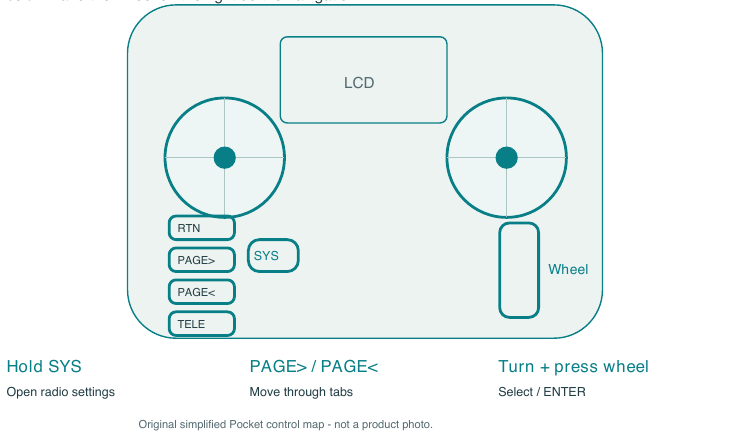
From the main screen, hold SYS to enter the radio settings/tools area. The four small buttons in the left column and the wheel on the right do the navigation.
RTN: go back or exit after the wizard has finished. PAGE>: next tab. PAGE<: previous tab. Menu wheel: rotate to move the selection; press it for ENTER/confirm. MDL is for model settings, not this hardware calibration.
Find S1 before you start. The Pocket also has an analog S1 pot on the rear, near the upper-left shoulder when looking at the back. Include it in the center and travel stages. The nearby SE momentary switch is not an analog pot.
Button labels and short/long-press behavior can differ with radio and firmware. If a short press of SYS already opens Radio Settings on your version, continue from there. Do not select the model setup wizard or the ExpressLRS Lua tool.
Open calibration: monochrome
Pocket and other monochrome EdgeTX radios
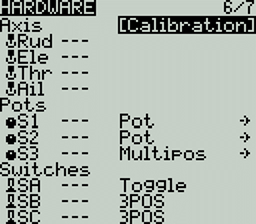
1. Start at the main screen. Hold SYS to open Radio Settings/Tools. Press PAGE> until you reach HARDWARE; use PAGE< if you go past it.
2. Rotate the wheel to highlight Calibration, then press the wheel (ENTER). The screenshot below is an actual EdgeTX manual example; its listed controls and tab count may differ from your Pocket.
3. Read the first prompt and press ENTER to start. Follow the wizard prompts in order: start, center controls, move through the full range, then finish. The next two illustrated steps explain what to do with your hands.
Choose Calibration for sticks and analog controls. Leave unrelated Hardware settings and the configured control types unchanged.
Open calibration: color
Same physical sequence, a different menu layout
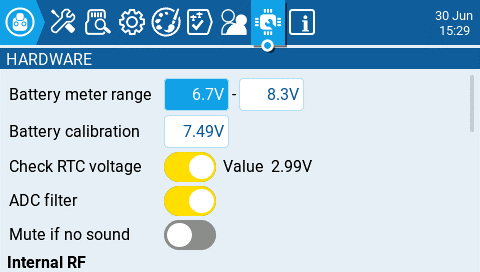
On a color-screen EdgeTX radio, open Radio Settings (SYS on radios with that key), select the Hardware tab, scroll to Inputs, and choose Calibration. Use touch or the wheel/ENTER as supported by your radio.
Scroll down to Inputs > Calibration. The picture shows the top of Hardware. The visible Battery calibration field is a different adjustment; do not use it for gimbals.
Start the wizard and follow its prompts. When asked for midpoint, center the sticks and analog controls. When asked for travel, move all analog controls through their normal range. Use the physical sequence on pages 5 and 6, then save as on page 7.
This reference follows the EdgeTX v2.12 manual. Older releases can arrange tabs and buttons differently. Match the Hardware / Calibration names rather than a fixed tab number or screen position.
Center every analog control
Wizard stage: midpoint / center
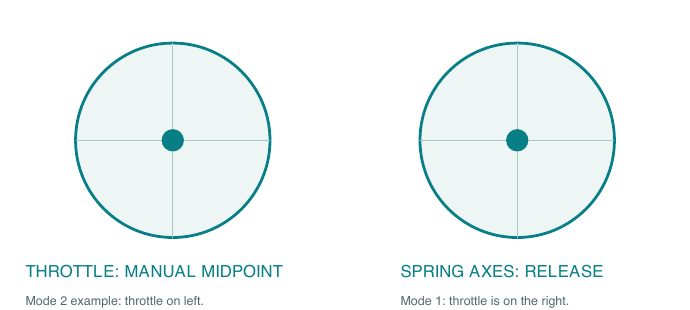
4. Let spring-loaded stick axes settle at center without pushing them. Put the non-spring throttle axis halfway through its travel by hand. Both gimbals must be centered for this stage, regardless of your stick mode.
5. Center S1 on the Pocket. On other radios, also center analog knobs and sliders; use their center detents if provided, otherwise the halfway position. Keep the controls steady while you confirm the midpoint prompt with ENTER or the on-screen button.
Throttle halfway is intentional here. Do not leave it fully down during the midpoint step. The aircraft stays disconnected. After saving calibration, put the throttle fully down again.
Do not use trim buttons to make the sticks look centered. The wizard is learning the physical controls. If a spring-loaded axis will not return freely, resolve that mechanical problem before trusting calibration.
Move through the normal range
Wizard stage: move sticks / pots / sliders
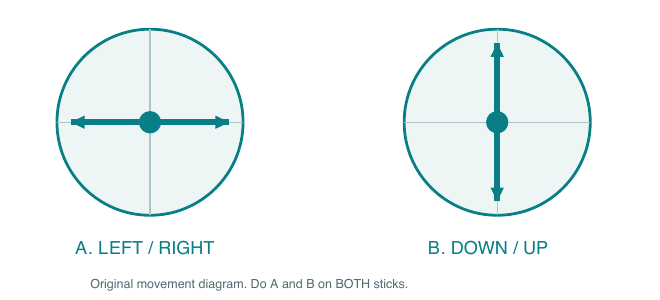
6. For each gimbal, sweep straight left to right through center, then straight down to up through center. Reach the normal stops gently. Repeat for the other gimbal, including the throttle axis.
Straight sweeps, normal pressure. Do not stir circles around the rim, force diagonal corners, or push hard beyond the normal stops. Extra force teaches the wrong limits.
7. Turn the Pocket S1 pot from one normal endpoint to the other. On other radios, also move every fitted analog pot and slider through its complete range. Do not skip a control just because the current model does not use it.
If an analog six-position control is fitted: select each position in sequence, pausing about one second at each. For the six-button style, go left to right. Ordinary toggle, momentary and customizable digital switches are not calibrated this way.
Once every analog control has been covered, proceed to the wizard's completion step. If you accidentally advanced too soon, finish or exit as directed and run the full calibration again.
Save, exit and verify
A completed wizard is only the first check

8. Use ENTER or the on-screen confirmation to finish and save the wizard. Follow any final prompt until the normal settings page returns; do not switch the radio off partway through. Exit with RTN/back, and put the throttle fully down.
9. Open the radio's available analog diagnostics (Hardware > Debug Analogs / Analogs, depending on version). Prefer a calibrated analog view for hardware checks. Raw values use a different scale. Move each control slowly and watch for smooth, complete travel.
10. Release spring-loaded axes from both directions several times. They should return consistently to center. The throttle does not spring back: place it at midpoint to check it, then return it fully down. Check S1 and any other analog controls too.
Channel monitors show the model's output. Trims, subtrims, curves, mixes and limits can change the displayed center and endpoints. A channel that does not read zero or +/-100 is not, by itself, proof of bad gimbal calibration. Compare hardware diagnostics before changing model settings.
Persistent drift, jumps or missing travel? Repeat once carefully. If it remains, investigate control movement, gimbal mounting, wiring and hardware, or ask RadioMaster/support. Do not hide a hardware fault with trims.
Before the next flight, verify the selected model and control directions separately. Any later powered aircraft checks need their own props-off procedure.
Your quick-reference checklist
Keep this page with the radio
[ ] Aircraft battery disconnected; correct antenna installed; stick ends fitted.
[ ] SYS > Hardware > Calibration (color: scroll to Inputs).
[ ] Start wizard. Center spring axes; manually center throttle, pots and sliders.
[ ] Confirm midpoint. Sweep each stick left/right, then down/up, gently.
[ ] Sweep S1 and every other analog pot/slider. Step any analog six-position control.
[ ] Finish and save. Exit; throttle down. Check smooth travel and repeatable center.
Official references and image credits
RadioMaster Pocket quick-start manual A1.8
EdgeTX: monochrome Radio Settings
EdgeTX: monochrome Hardware and calibration
EdgeTX: color Hardware and calibration
EdgeTX manual source and license
The two Hardware screenshots are from the EdgeTX User Manual, © 2025 EdgeTX, licensed CC BY-SA 4.0; reproduced unaltered except for display size. This guide adapts EdgeTX calibration guidance and is shared under CC BY-SA 4.0. Original schematic illustrations: Fly Gear Swap. RadioMaster material was consulted for control locations; no RadioMaster product photograph is republished. Screens vary by firmware. This is an independent guide, not an official RadioMaster or EdgeTX publication.